Write Smarter — Magic Compose & AI Auto Reply
Your AI writing assistant, built right into your encrypted messenger.
Magic Compose: From Rough Draft to Perfect Message
We've all sent a message and immediately wished we'd worded it differently. Or stared at a blank text field for five minutes trying to craft the perfect response. Birbli's Magic Compose eliminates both problems.
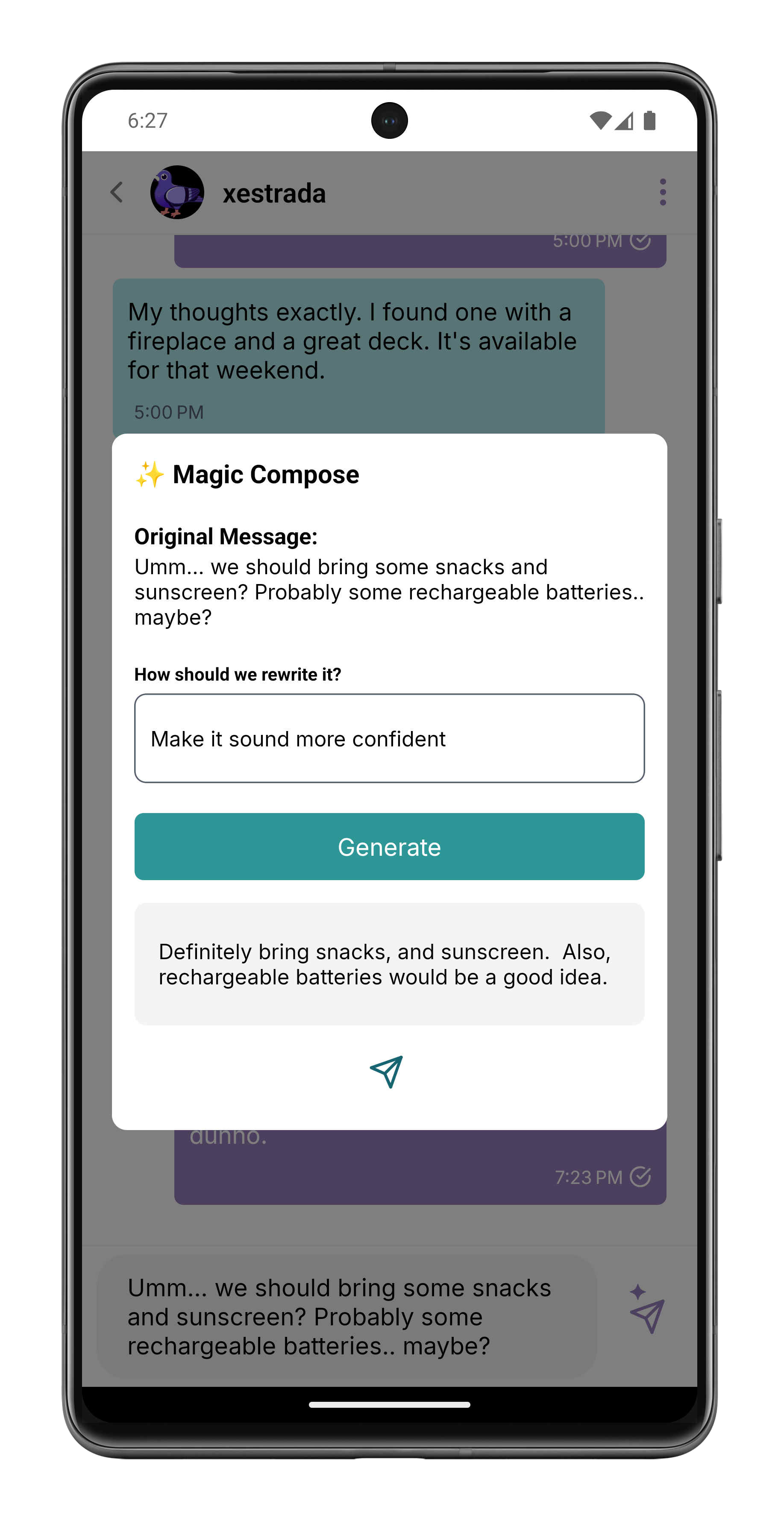
Here's how it works: Type your rough thoughts into the message input — keywords, fragmented ideas, half-formed sentences. Then long-press the sparkle send button (the same button you normally tap to send a message) and Magic Compose takes over. Using an on-device AI model, it rewrites your draft into a polished, well-structured message.
Note: A normal tap on the sparkle send button sends your message as usual. A long-press triggers the AI magic — this dual-action design keeps the input bar clean while giving you instant access to AI features. Birbli AI must be enabled in your Profile settings for these features to appear.
Magic Compose doesn't just fix grammar. It can:
- Professional rewrite: Transform casual thoughts into formal, business-appropriate language
- Friendly tone: Warm up a blunt message with empathy and conversational flair
- Concise version: Compress a rambling paragraph into a crisp, to-the-point message
- Creative flair: Add personality, humor, or drama to make your message stand out
- Clear & direct: Remove ambiguity and make your intent crystal clear
Once Magic Compose generates its suggestion, you see a clean modal with the rewritten message. Review it, accept it to send immediately, or edit it further before sending. You're always in full control — the AI is your assistant, not your autopilot.
Why power users love it: Pro Chatters use Magic Compose to craft professional, well-written responses for clients. It ensures every message reflects their best self — no typos, no awkward phrasing, no second-guessing. Your reputation is only one message away, and Magic Compose makes sure it's a good one.
AI Auto Reply: The Perfect Response, Generated for You
Magic Compose works with what you type. But what if you don't even know where to start? Enter AI Auto Reply — Birbli's context-aware reply suggestion engine.
When you receive a message and don't know how to respond, simply long-press the sparkle send button with the input bar empty. Birbli analyzes the entire conversation context — the full chat history, topics discussed, and the other person's last message — and generates a set of intelligent reply suggestions tailored to the situation.
The sparkle send button is brilliantly dual-purpose: long-press with text typed triggers Magic Compose, while long-press with an empty input triggers Auto Reply. A normal tap always sends your message as usual. It's an elegant design that packs powerful AI into a single button.
Here's what makes Auto Reply truly intelligent:
- Full conversation context: The AI doesn't just look at the last message — it reads the entire conversation history to understand tone, context, and ongoing topics
- Username-aware: The AI knows who you are and who you're talking to, generating responses appropriate for the relationship
- Multiple suggestions: Get several reply options to choose from — pick the one that best matches what you want to convey
- One-tap send: Tap your preferred suggestion and it sends immediately — no copying, no pasting
Use cases:
- Quick responses: Busy and need to reply fast? Auto Reply gives you sendable responses in seconds
- Social situations: Don't know how to respond to a compliment, joke, or awkward message? Let AI craft the perfect reply
- Client communication: As a Pro Chatter, ensure every client interaction is thoughtful and professional
- Writer's block: Stuck on what to say? Auto Reply gives you starting points you can customize
Privacy, always: Both Magic Compose and Auto Reply run entirely on your device using the native on-device LLM. Your conversations are never sent to external AI services. The AI processes happen locally, in real time, maintaining the same end-to-end encryption standard that Birbli is built on.
How to Get Started
AI features require a compatible device with on-device LLM capabilities. Once your device is eligible:
For Magic Compose: Type a rough draft in the message input → Long-press the sparkle send button → Review the AI-generated rewrite → Accept to send or edit further.
For Auto Reply: Leave the input bar empty → Long-press the sparkle send button → Review AI-generated reply suggestions → Tap the one you like to send instantly.
Both features live on the same sparkle send button — giving you two AI-powered tools to write better, faster, and more thoughtfully, without cluttering the UI. Your messages will never misspeak again.
Write smarter, not harder. Download Birbli today and let AI elevate every message.